

 SEARCH

Lighthouse SEO Audits for SPAs

January 2nd, 2026
posted by Radomir Basta to google lighthouse audit, Google Lighthouse SEO, lighthouse seo audits for spas, single page application seo audit, spa seo auditYour single-page application loads instantly for users. Lighthouse gives it a 95. But Google still can’t find half your pages. This disconnect costs you traffic – and it’s fixable.
Most teams run Lighthouse, see green scores, and move on. Then they wonder why their React routes don’t rank or their Vue content never gets indexed. The problem isn’t the tool. It’s that Lighthouse measures user experience while search engines need crawlability.
This guide shows how to audit SPAs the right way. You’ll learn to interpret Lighthouse results through an SEO lens, identify rendering and routing issues that block bots, and create ticket-ready fixes your dev team can ship. No generic checklists – just actionable specifications that bridge the gap between diagnosis and implementation.
Why Standard Lighthouse Audits Miss SPA-Specific SEO Issues
Lighthouse excels at measuring user-facing metrics. It captures Core Web Vitals, accessibility scores, and best practices. But it doesn’t tell you if Googlebot can render your client-side routes or if your hydration strategy blocks content discovery.
SPAs introduce three critical challenges that standard audits overlook:
- Client-side rendering delays content availability until JavaScript executes
- Routing mechanisms create URLs that may not resolve for crawlers
- Hydration bottlenecks inflate Largest Contentful Paint and Interaction to Next Paint
The Rendering Reality Gap
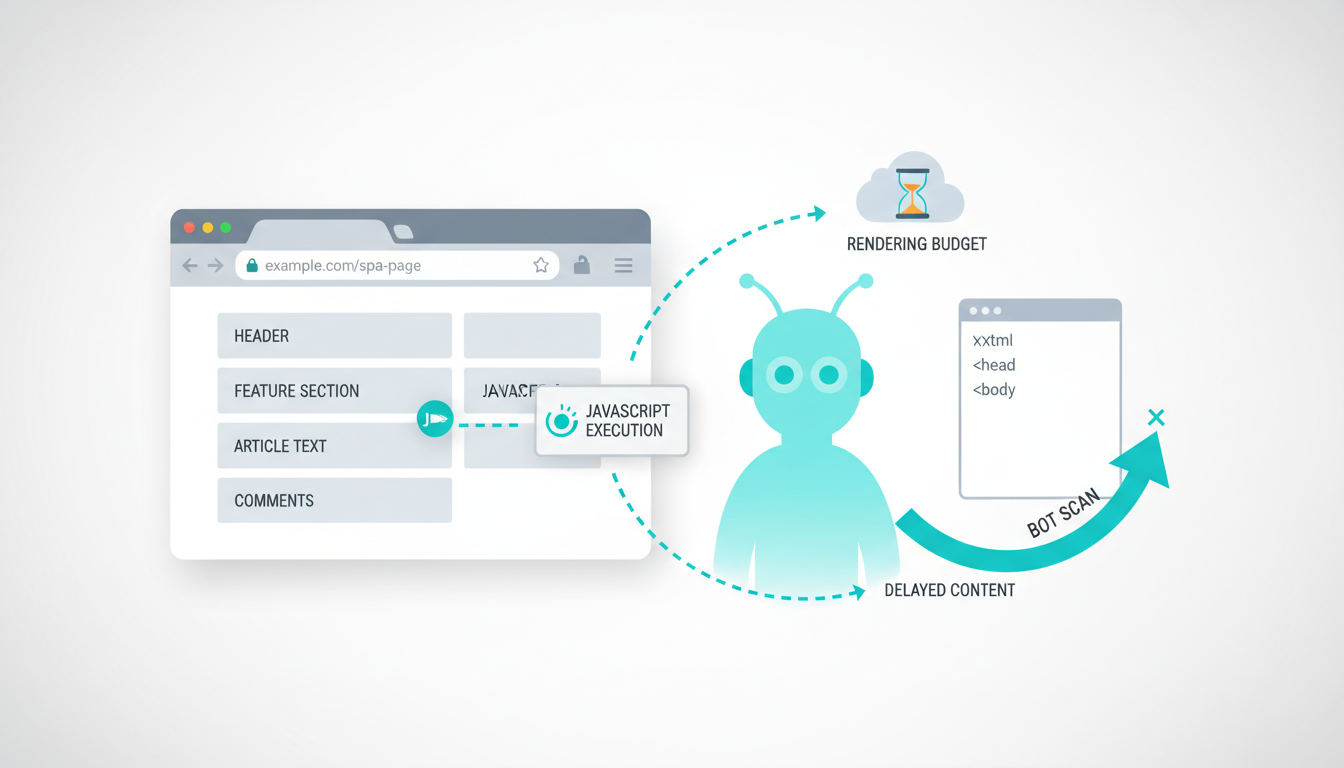
When you run Lighthouse in Chrome DevTools, you’re testing with a modern browser that executes JavaScript instantly. Search engines use rendering budget constraints – they limit how long they’ll wait for your JS to finish.
If your SPA takes 8 seconds to hydrate on a throttled connection, Googlebot might see a blank page. Lighthouse shows you the final rendered state. It doesn’t show you what bots experience during those critical first seconds.
What Search Engines Actually Need
Bots need five things from your SPA:
- Initial HTML with meaningful content before JavaScript runs
- Discoverable URLs that resolve without hash fragments or state dependencies
- Internal links in the DOM that crawlers can follow
- Metadata and structured data available at page load
- Fast rendering that completes within the rendering budget
Standard Lighthouse audits measure performance and accessibility. They don’t verify crawlability, indexability, or link equity flow. That’s why you need a technical SEO audit approach designed specifically for JavaScript-heavy sites.
Understanding SPA Rendering Strategies and SEO Impact
Your rendering choice determines whether search engines can access your content. Each strategy trades off between performance, SEO visibility, and development complexity.
Client-Side Rendering
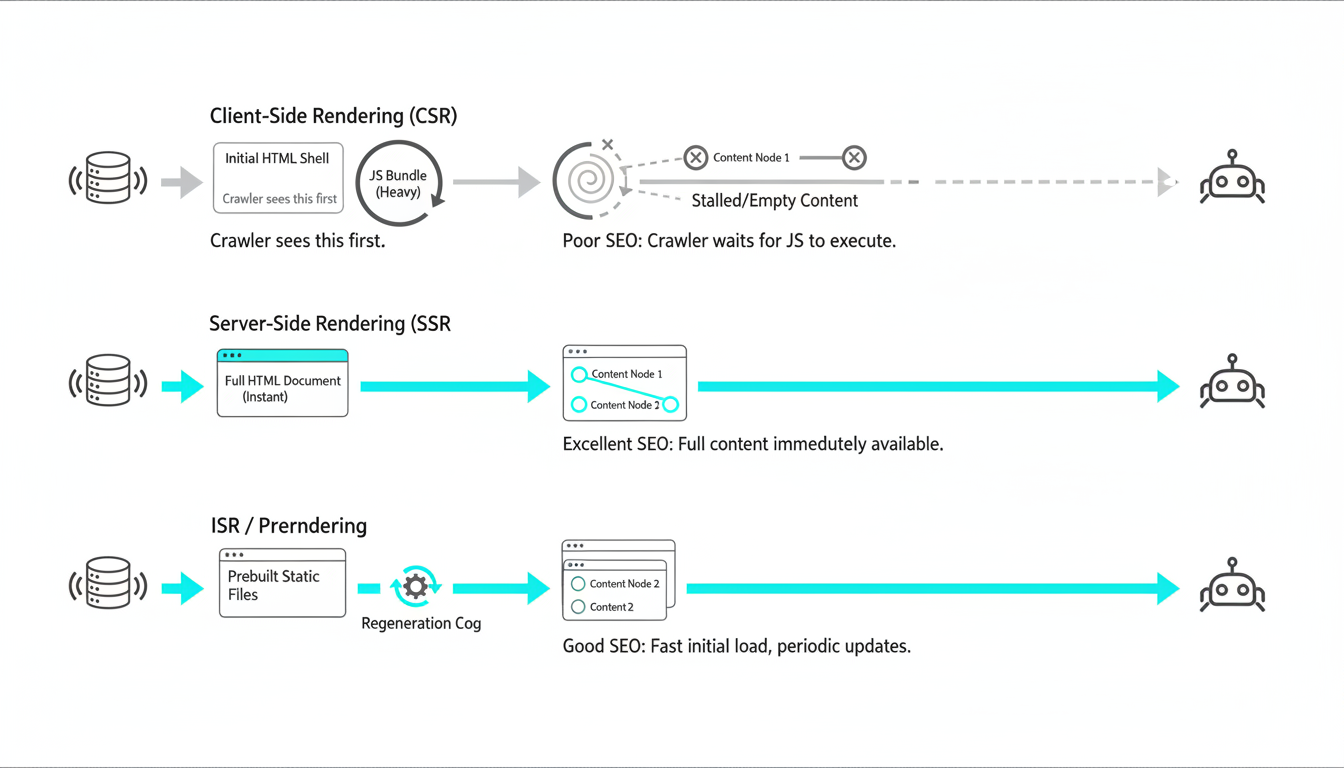
CSR ships minimal HTML and builds the page entirely with JavaScript. Users with fast connections see instant navigation. Bots see empty shells until JS executes.
SEO impact:
- High risk of indexation gaps if rendering budget exceeded
- Delayed content discovery hurts time-to-index
- Internal links may not be crawlable if generated client-side
- Core Web Vitals suffer from large JS bundles and hydration delays
Use CSR only for authenticated dashboards or tools where SEO doesn’t matter. For public content, you need a different approach.
Server-Side Rendering
SSR generates full HTML on the server for each request. Bots get complete content immediately. Users see content fast, then JavaScript hydrates for interactivity.
SEO benefits:
- Content available in initial HTML response
- All routes crawlable without JavaScript execution
- Faster Largest Contentful Paint
- Internal links present in DOM at page load
Tradeoffs: Server costs increase. Time to First Byte can be slower if server rendering is complex. Hydration still affects INP.
Incremental Static Regeneration
ISR pre-renders pages at build time and regenerates them on-demand after a set interval. You get static HTML speed with the ability to update content without full rebuilds.
This works well for content that changes daily or weekly. Product catalogs, blog posts, and category pages are ideal candidates. Real-time content like stock prices or live feeds still need SSR or client-side updates.
Prerendering
Prerendering generates static HTML for specific routes at build time. It’s simpler than SSR but less flexible than ISR. You define which routes to prerender, and the build process creates HTML files for each.
Best for sites with a finite set of important URLs. Marketing pages, landing pages, and core product pages work well. Long-tail content or user-generated pages don’t scale with this approach.
Dynamic Rendering
Dynamic rendering detects bot requests and serves pre-rendered HTML to crawlers while sending the CSR version to users. Google officially supports this as a workaround, not a long-term solution.
Use dynamic rendering as a temporary bridge while you implement proper SSR or ISR. It adds infrastructure complexity and introduces a gap between what users and bots see.
Setting Up Lighthouse for SPA Audits
Configuration matters. Default Lighthouse settings don’t match how search engines crawl SPAs. You need to emulate bot conditions and test critical user paths.
Audit Configuration Checklist
Start with these settings to match real-world crawling conditions:
- Device: Mobile emulation (most search traffic is mobile-first)
- Throttling: Simulated 4G (matches Google’s mobile testing environment)
- Storage state: Clear cookies and cache (tests first-visit experience)
- JavaScript: Enabled (but test with JS disabled separately to verify SSR)
Route Coverage Planning
Don’t just audit your homepage. Test the routes that matter for organic traffic:
- Homepage – your primary entry point and hub for internal linking
- Category pages – high-traffic landing pages for broad queries
- Product or article pages – long-tail content that drives conversions
- Stateful pages – routes that depend on user actions or URL parameters
For each route, run Lighthouse three times and average the results. Single runs hide variability from network conditions and server response times.
Command Line Setup for Consistency
Use Lighthouse CLI for repeatable audits across your team. This configuration matches mobile bot conditions:
Example command:
lighthouse https://yoursite.com/route --preset=desktop --throttling-method=simulate --throttling.cpuSlowdownMultiplier=4 --output=json --output-path=./reports/route-audit.json
Save the JSON output. You’ll need it for tracking changes over time and feeding data into your monitoring system.
Authentication Handling
If your SPA has gated content, you need to test both authenticated and unauthenticated states. Use Puppeteer to log in before running Lighthouse:
- Audit public routes without authentication first
- Test login flows separately for UX and security issues
- Verify that public content doesn’t require authentication to render
Many SPAs accidentally gate content behind auth checks that fire client-side. Bots can’t log in, so that content never gets indexed.
Running and Interpreting SPA-Focused Lighthouse Audits
Run your audits across all critical routes. Export the JSON reports. Now you need to translate those scores into SEO-specific action items.
Performance Category – Core Web Vitals Focus
Lighthouse measures six performance metrics. Three directly impact rankings:
- Largest Contentful Paint (LCP): Must be under 2.5 seconds on mobile
- Interaction to Next Paint (INP): Target under 200ms for good UX
- Cumulative Layout Shift (CLS): Keep below 0.1 to avoid layout instability
SPAs commonly fail LCP because of hydration delays. Your HTML loads fast, but users see a blank screen until JavaScript executes and renders content. This is a rendering strategy problem, not a caching problem.
SEO Category – Crawlability and Indexability
Lighthouse’s SEO category checks basic on-page factors. For SPAs, pay attention to these specific audits:
- Document has a meta description: Verify it’s in the initial HTML, not added by JS
- Page has successful HTTP status code: Check that client-side routing doesn’t break status codes
- Links are crawlable: Ensure internal links use proper anchor tags, not JavaScript click handlers
- Document has a valid hreflang: Critical for international SPAs with language routing
These checks are basic, but they catch common SPA mistakes. Many React apps generate links with onClick handlers instead of href attributes. Crawlers can’t follow those.
Best Practices Category – JavaScript Errors and Security
JavaScript errors block rendering. If your SPA throws errors during initialization, content never loads. Lighthouse flags these under Best Practices.
Check for:
- Console errors during page load – these can halt hydration
- HTTPS usage – mixed content blocks resources
- Image aspect ratios – missing dimensions cause layout shifts
A single uncaught error in your router initialization can make entire route branches uncrawlable. Fix errors before optimizing performance.
Accessibility Category – Semantic HTML and ARIA
Accessibility and SEO overlap. Proper heading hierarchy helps both screen readers and search engines understand content structure. Semantic HTML signals content importance.
SPAs often generate divs instead of semantic elements. Use proper tags:
- nav for navigation menus
- article for content blocks
- h1-h6 for heading hierarchy
- main for primary content
Lighthouse accessibility audits catch missing alt text, poor contrast, and keyboard navigation issues. These affect both user experience and how search engines interpret your content.
Mapping Lighthouse Findings to SEO Architecture Issues
Lighthouse tells you what’s slow or broken. You need to connect those findings to discoverability and indexation outcomes.
From Performance Scores to Rendering Decisions
If LCP exceeds 2.5 seconds, you have three options:
- Optimize existing CSR: Code-split, lazy-load, reduce bundle size
- Add SSR or ISR: Pre-render critical routes on the server
- Implement prerendering: Generate static HTML at build time
The decision depends on your content update frequency and infrastructure. Daily content updates work with ISR. Static marketing pages work with prerendering. Real-time dashboards stay CSR but don’t need SEO.
From SEO Audits to Crawl Path Analysis
Lighthouse checks individual pages. You need to verify link equity flow across your entire SPA. Map your routing structure:
- Which routes are linked from your homepage?
- How many clicks does it take to reach deep content?
- Are internal links present in the initial HTML or added client-side?
- Do route changes update the canonical tag?
Many SPAs use client-side routing that breaks traditional link equity. If your router generates links with JavaScript instead of anchor tags, crawlers can’t follow them. Check your complete technical SEO audit service guide for link architecture analysis.
From Best Practices to Indexation Blockers
JavaScript errors don’t just hurt UX. They prevent content from rendering, which means bots see nothing to index. Console errors during hydration are indexation blockers.
Check your error tracking:
- Are errors happening during initial page load?
- Do errors occur on specific routes or all pages?
- Are third-party scripts breaking your render?
Fix errors before optimizing speed. A fast page that doesn’t render is useless.
Choosing the Right Rendering Strategy for Your SPA
Your rendering choice determines SEO success. Use this decision framework to pick the right approach for each content type.
Decision Criteria
Evaluate each route type against these factors:
- Content update frequency: Static, daily, hourly, real-time
- SEO importance: High-traffic landing page vs. low-volume utility page
- Personalization needs: Same content for all users vs. user-specific
- Infrastructure constraints: Server capacity, build time limits
Rendering Strategy Matrix
Match your content type to the appropriate strategy:
- Marketing pages, documentation: Prerendering or static generation
- Product catalogs, blog posts: ISR with daily or weekly regeneration
- Category pages, high-traffic landing pages: SSR for freshness
- User dashboards, authenticated tools: CSR (SEO not required)
- Mixed public/private content: Hybrid approach with route-level configuration
Implementation Thresholds
Use these measurable thresholds to trigger rendering changes:
- LCP over 2.5 seconds on 4G emulation – consider SSR or prerendering
- INP over 200ms – reduce hydration work or defer non-critical JS
- Pages not indexed after 30 days – verify bot-rendered HTML availability
- JavaScript errors in top 10% of sessions – fix before optimizing speed
Framework-Specific Considerations
Each SPA framework has different rendering capabilities:
React with Next.js: Supports SSR, SSG, and ISR out of the box. Use getServerSideProps for SSR, getStaticProps with revalidate for ISR.
Angular with Universal: SSR requires server setup. Prerendering works for static routes. Hydration can be slow – optimize with lazy loading.
Vue with Nuxt: Similar to Next.js with SSR and static generation. Use asyncData for server-side data fetching.
Creating Ticket-Ready Specifications from Lighthouse Findings
Audit reports don’t ship code. You need to translate findings into actionable tickets with clear ownership and acceptance criteria.
Issue Categorization and Ownership
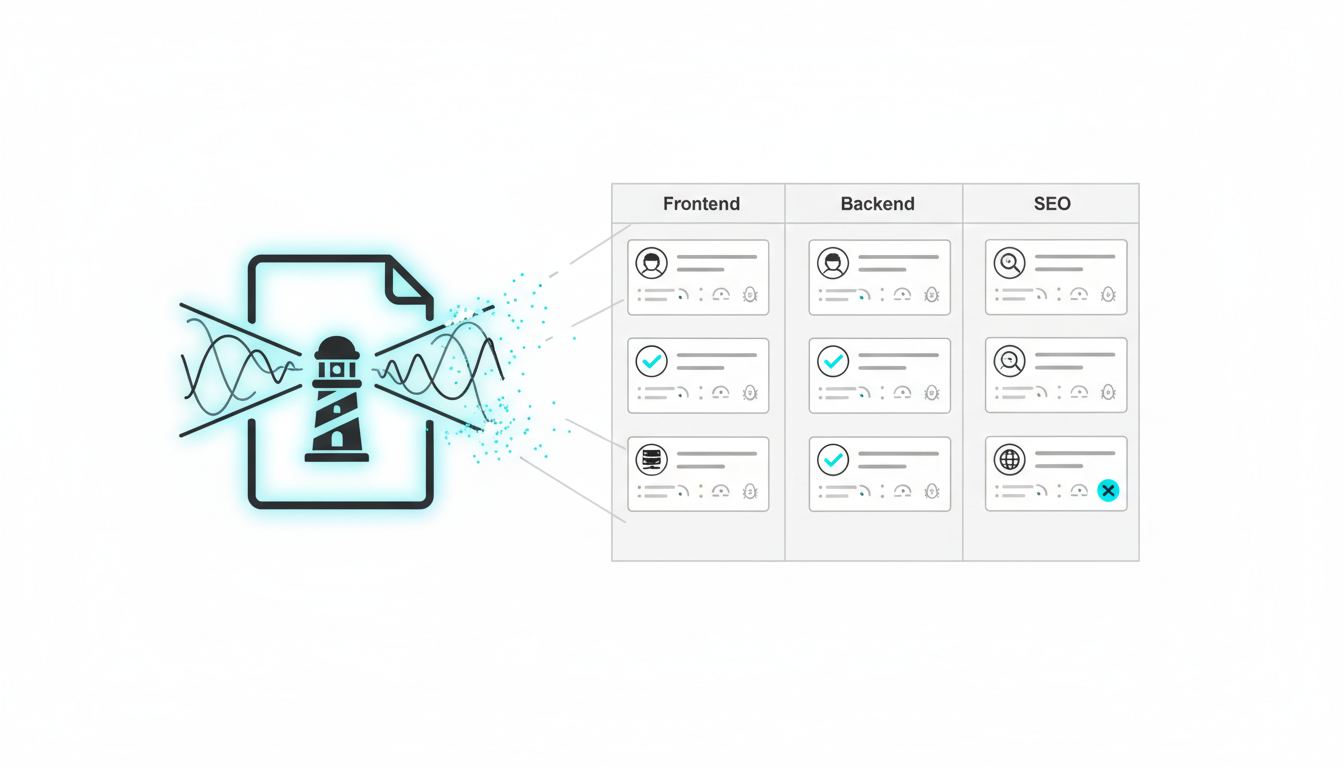
Group Lighthouse findings by owner:
- Frontend Dev: Component optimization, code-splitting, lazy loading
- Backend/Infrastructure: SSR setup, caching, CDN configuration
- SEO: Metadata, structured data, internal linking strategy
- Cross-functional: Routing changes, rendering strategy decisions
Ticket Template Structure
Each ticket needs five elements:
- Problem statement: What Lighthouse found and why it matters
- SEO impact: How this affects rankings, indexation, or traffic
- Proposed solution: Specific technical approach
- Acceptance criteria: Measurable success metrics
- Testing plan: How to verify the fix works
Example Ticket – LCP Optimization
Title: Reduce LCP on product pages from 3.8s to under 2.5s
Problem: Lighthouse reports LCP of 3.8 seconds on product pages. This exceeds Google’s 2.5s threshold and correlates with 15% higher bounce rate on mobile.
SEO Impact: Poor LCP affects mobile rankings. Product pages drive 40% of organic traffic. Fixing this could recover lost visibility.
Solution: Implement ISR for product pages. Pre-render HTML at build time, regenerate every 24 hours. Move product image loading above the fold, add priority hint.
Acceptance Criteria:
- LCP under 2.5s on 75th percentile of mobile sessions
- Product content visible in initial HTML (verify with curl)
- No increase in server costs above $X/month
Testing: Run Lighthouse on 10 product pages before and after. Check CrUX data after 28 days. Verify bot-rendered HTML with Fetch as Google.
Example Ticket – Crawlability Fix
Title: Make category navigation links crawlable
Problem: Category links use onClick handlers without href attributes. Lighthouse flags “Links are not crawlable.” Google can’t discover category pages through homepage navigation.
SEO Impact: Category pages represent 60% of target keywords but aren’t being discovered or indexed. Internal link equity isn’t flowing to these pages.
Solution: Refactor navigation component to use proper anchor tags with href attributes. Maintain client-side routing with event.preventDefault() on click.
Acceptance Criteria:
- All navigation links have href attributes in initial HTML
- Client-side navigation still works (no full page reload)
- Lighthouse “Links are crawlable” audit passes
Testing: View page source (not inspect element) and verify href attributes present. Test with JS disabled to confirm links work. Check Lighthouse SEO score improves.
Framework-Specific Implementation Examples
Each SPA framework requires different approaches to fix Lighthouse findings. Here are implementation patterns for the three major frameworks.
React and Next.js – SSR and ISR Setup
Next.js makes SSR straightforward. Use getServerSideProps to render pages on each request:
For pages needing real-time data: Export getServerSideProps to fetch data server-side. This ensures content is in the initial HTML response.
For pages with daily updates: Use getStaticProps with revalidate parameter. This implements ISR – pages regenerate after the specified interval.
For static content: Use getStaticProps without revalidate. Pages generate at build time and never change until next deployment.
Angular with Universal – Prerendering and SSR
Angular Universal adds SSR capabilities to Angular apps. Setup requires more configuration than Next.js but provides similar benefits.
Key implementation steps:
- Add @nguniversal/express-engine to your project
- Configure server.ts to handle SSR requests
- Use TransferState to avoid duplicate HTTP calls during hydration
- Prerender static routes at build time with angular-prerender
Common gotcha: Angular’s hydration can be slow. Lazy-load modules that aren’t needed for initial render. Defer non-critical animations until after hydration completes.
Vue and Nuxt – Static Generation and SSR
Nuxt provides both SSR and static site generation. Choose based on your content update needs.
Static generation: Run nuxt generate to create static HTML files for all routes. Deploy to CDN. Best for content that changes on deployment, not continuously.
SSR mode: Run nuxt start to serve pages with SSR. Use asyncData to fetch data server-side. Content stays fresh but requires a Node server.
Hybrid approach: Use target: ‘static’ with payload generation for most pages, then add SSR for specific routes that need real-time data.
Post-Implementation Monitoring and Regression Prevention
Shipping fixes is half the work. You need daily monitoring to catch regressions before they cost you traffic.
Lighthouse CI Integration
Add Lighthouse to your CI pipeline. Run audits on every pull request. Block merges if scores drop below thresholds:
- Performance score must stay above 85
- SEO score must be 100
- Accessibility score above 90
- LCP under 2.5 seconds
- INP under 200ms
Configure Lighthouse CI to test critical routes. Don’t just audit the homepage. Include category pages, product pages, and any route that drives organic traffic.
Core Web Vitals Field Data Tracking
Lighthouse uses lab data. You need field data from real users. Set up CrUX API monitoring to track:
- 75th percentile LCP, INP, and CLS
- Mobile vs. desktop performance gaps
- Geographic performance variations
- Week-over-week trend changes
Alert when metrics degrade. A 10% increase in LCP might not seem urgent, but it compounds over time. Catch regressions within 24 hours, not after the next quarterly review.
Indexation and Crawl Monitoring
Track these metrics daily:
- Pages indexed: Total count from Google Search Console
- Crawl errors: 404s, 500s, timeout errors
- JavaScript errors: Console errors during page load
- Sitemap coverage: Percentage of submitted URLs actually indexed
Set alerts for sudden drops. If 100 pages disappear from the index overnight, you have a rendering or robots.txt issue that needs immediate attention.
Rendering Budget Verification
Use Google’s Mobile-Friendly Test and Rich Results Test to verify bot-rendered output. These tools show you what Googlebot actually sees after JavaScript execution.
Run these tests weekly on your top 20 landing pages. Compare the rendered HTML to what users see. Gaps indicate rendering budget issues or JavaScript errors that only affect bots.
Common SPA SEO Mistakes That Lighthouse Doesn’t Catch
Lighthouse measures what it can observe in a single page load. It misses architectural issues that span your entire site.
Client-Side Routing Without Canonical Updates
When users navigate between routes, your SPA might not update the canonical tag. This creates duplicate content issues. Every route needs a unique canonical that updates on navigation.
Test this manually. Navigate through your SPA and view the page source at each route. If the canonical tag doesn’t change, you have a problem.
Metadata That Loads After Initial Render
Many SPAs inject meta descriptions and title tags with JavaScript. This works for users but not for crawlers. Metadata must be in the initial HTML response.
Verify with curl. If you don’t see your title and description in the HTML source, search engines won’t either.
Internal Links Generated Client-Side
SPAs often build navigation menus with JavaScript. If those links aren’t in the initial HTML, crawlers can’t follow them. Your link equity doesn’t flow, and deep pages never get discovered.
Check your navigation HTML before JavaScript runs. Use “View Page Source” not “Inspect Element.” If you see empty divs instead of anchor tags, you need to fix your rendering strategy.
Hash-Based Routing
URLs with hash fragments (example.com/#/products) don’t work for SEO. Search engines treat everything after the hash as a client-side identifier, not a unique URL.
Use HTML5 History API routing instead. This creates real URLs (example.com/products) that search engines can crawl and index separately.
Infinite Scroll Without Pagination
Infinite scroll improves UX but breaks crawlability. Bots can’t scroll, so they only see the first batch of content. You need paginated URLs that load specific content sets.
Implement both. Show infinite scroll to users, but provide paginated URLs in your sitemap and internal links. This gives crawlers access to all content.
Advanced Techniques for Enterprise SPAs
Large-scale SPAs need sophisticated approaches beyond basic SSR or prerendering.
Route-Level Rendering Configuration
Not every route needs the same rendering strategy. Configure rendering per route based on traffic and update frequency:
- Homepage: SSR for freshness
- Product pages: ISR with 24-hour revalidation
- Blog posts: Static generation (content rarely changes)
- User dashboards: CSR (no SEO needed)
This hybrid approach optimizes both performance and infrastructure costs. You don’t waste server resources rendering pages that don’t need it.
Edge Rendering for Global Performance
Deploy your SSR logic to edge locations. This reduces Time to First Byte for international users. Cloudflare Workers, Vercel Edge Functions, and AWS Lambda@Edge all support edge rendering.
Edge rendering is particularly effective for SPAs with global audiences. Users in Asia don’t need to wait for a US server to render their page.
Selective Hydration
Full page hydration is expensive. React 18’s selective hydration lets you prioritize interactive components. Non-interactive content doesn’t need hydration at all.
This reduces INP by limiting the JavaScript work required before the page becomes interactive. Users can engage with critical features while the rest of the page hydrates in the background.
Streaming SSR
Traditional SSR waits for all data fetching to complete before sending HTML. Streaming SSR sends HTML as it’s generated. Users see content faster, even if some parts are still loading.
This improves perceived performance and LCP. The browser can start rendering and downloading resources while the server finishes generating the rest of the page.
Coordinating Implementation Across Teams
Technical fixes require coordination between SEO, frontend, backend, and infrastructure teams. Clear ownership prevents tickets from stalling.
Creating a RACI Matrix
Define who is Responsible, Accountable, Consulted, and Informed for each type of fix:
- Rendering strategy changes: Frontend responsible, Backend consulted, SEO informed
- Metadata and structured data: SEO responsible, Frontend accountable
- Server configuration: Infrastructure responsible, Backend consulted
- Monitoring setup: DevOps responsible, SEO and Frontend consulted
Sprint Planning Integration
Don’t create a separate SEO backlog. Integrate SEO tickets into regular sprint planning:
- Prioritize by traffic impact and implementation effort
- Bundle related fixes (all routing changes in one sprint)
- Include testing and monitoring setup in ticket estimates
- Schedule regression testing for the sprint after implementation
Definition of Done Checklist
Every SEO ticket needs verification before marking complete:
- Lighthouse scores meet thresholds on affected routes
- Bot-rendered HTML verified with Mobile-Friendly Test
- Monitoring alerts configured and tested
- Documentation updated with new configuration
- Stakeholders notified of changes
Measuring Success and Reporting ROI
Track metrics that connect Lighthouse improvements to business outcomes. Scores don’t matter if they don’t drive traffic and conversions.
Leading Indicators
These metrics change quickly after fixes ship:
- Lighthouse scores: Should improve within days
- Core Web Vitals: CrUX data updates within 28 days
- Indexation rate: New pages should index within 7-14 days
- Crawl efficiency: Pages crawled per day should increase
Lagging Indicators
These take longer but show real business impact:
- Organic traffic: Expect changes 30-90 days after fixes
- Keyword rankings: Monitor top 20 keywords weekly
- Revenue from organic: Track conversions by traffic source
- Engagement metrics: Bounce rate and time on page improvements
Attribution Framework
Connect specific fixes to traffic changes:
- Baseline traffic for affected pages before implementation
- Track traffic weekly for 90 days after fixes ship
- Compare to control group of unchanged pages
- Calculate lift attributable to technical improvements
This proves ROI and helps prioritize future work. If SSR implementation drove a 40% traffic increase, that justifies expanding SSR to more routes.
Frequently Asked Questions
How often should I run Lighthouse audits on my SPA?
Run Lighthouse in CI on every pull request to catch regressions before they ship. Manually audit critical routes monthly to track progress. Schedule comprehensive audits quarterly to review your entire site architecture and identify new opportunities.
Can I rely on Lighthouse scores alone for SEO success?
No. Lighthouse measures user experience and technical best practices. It doesn’t verify crawlability, indexation, or bot-rendered output. Combine Lighthouse with Google Search Console data, Mobile-Friendly Test results, and field performance metrics from real users.
Should I implement SSR for my entire SPA?
Not necessarily. Use SSR for high-traffic public pages that need SEO visibility. Keep CSR for authenticated sections where search engines don’t need access. Consider ISR or prerendering for content that updates less frequently. Match your rendering strategy to each route’s requirements.
What’s the fastest way to improve LCP on a client-side rendered SPA?
Add SSR or prerendering to put content in the initial HTML. If that’s not feasible short-term, optimize your JavaScript bundle size, implement code-splitting, and defer non-critical scripts. Prioritize loading above-the-fold images and use resource hints to speed up critical asset loading.
How do I verify that search engines can actually render my SPA content?
Use Google’s Mobile-Friendly Test and Rich Results Test to see what Googlebot renders. Compare the rendered HTML to your page source. Check Search Console’s URL Inspection tool for the rendered screenshot. Run curl on your URLs to verify content is in the initial HTML response.
What’s the difference between dynamic rendering and SSR?
SSR renders pages server-side for all requests. Dynamic rendering detects bot user agents and serves pre-rendered HTML only to crawlers while sending CSR to users. SSR is a proper solution. Dynamic rendering is a temporary workaround that adds complexity and creates gaps between user and bot experiences.
How long does it take to see SEO improvements after fixing Lighthouse issues?
Technical improvements like faster LCP show up in CrUX data within 28 days. Indexation improvements happen within 7-14 days for new pages. Ranking and traffic changes typically take 30-90 days as search engines recrawl your site and reassess your pages. Monitor leading indicators weekly and lagging indicators monthly.
Ship Implementation-Ready Improvements
You now have a complete framework for auditing SPAs with Lighthouse and translating findings into shipped code. The key steps:
- Configure Lighthouse to match bot crawling conditions
- Test critical routes, not just your homepage
- Map performance and SEO findings to rendering and routing decisions
- Create ticket-ready specifications with clear ownership and acceptance criteria
- Monitor daily to catch regressions before they impact traffic
Most teams stop at the audit report. You need to close the gap between diagnosis and implementation. That means engineering-level specifications, cross-functional coordination, and continuous monitoring.
If your SPA needs an implementation-ready roadmap that connects Lighthouse findings to shipped improvements, explore our technical SEO audit and implementation services. We coordinate directly with development teams to ensure specifications get built, not just documented.
The difference between a good audit and results is execution. Focus on shipping fixes, not collecting reports. Your engineering-driven approach to technical SEO starts with clear specifications and ends with measurable traffic improvements.