

 SEARCH

Best SEO Tools for Technical SEO Audits USA 2025

Most audit tools surface issues. Few help you ship fixes – at enterprise scale. Your team runs a crawler, exports a spreadsheet with 2,000 flagged URLs, and then… nothing. The findings sit in a Jira backlog for months because they lack the context and specificity developers need to act.
Enterprise sites face JavaScript rendering traps, misallocated crawl budget, and internationalization drift. Tool outputs often die in spreadsheets because they’re not ticket-ready or sprint-aligned. You need tools that produce actionable specifications, not generic checklists.
We compare 2025’s top technical SEO tools by how they accelerate implementation – log file analysis, JavaScript rendering validation, Core Web Vitals diagnostics, and dev workflow fit. Engineering-led audits with proprietary tech and decade-plus implementation experience inform this comparison.
Why Enterprise Audits Fail Without Implementation-Ready Tools
The gap between detection and deployment kills most technical SEO initiatives. You identify a hreflang misconfiguration across 47 regional variants, but the ticket you create lacks the exact attribute values, URL patterns, and edge cases developers need. Three sprints later, the issue remains unfixed.
Enterprise constraints demand different evaluation criteria than small-site audits. Your tool stack must handle scale, security, rate limits, and data governance while producing outputs that translate directly into sprint-ready tickets.
2025 Technical Landscape Shifts
The audit requirements for enterprise sites have evolved significantly. INP (Interaction to Next Paint) replaced FID as a Core Web Vitals metric in March 2024, requiring new measurement approaches. JavaScript frameworks dominate modern web architectures, creating rendering and indexation challenges that basic crawlers miss entirely.
- INP priority – interaction responsiveness now drives ranking more than initial load speed
- JavaScript rendering complexity – SPAs and hydration patterns create partial indexing traps
- Edge rendering – CDN-level transformations affect what search engines actually see
- AI-assisted audits – machine learning models help prioritize fixes by impact
- Real-time monitoring – continuous validation catches regressions before they compound
Evaluation Rubric for Enterprise Tool Selection
We assess tools across five dimensions that determine implementation velocity. Detection accuracy tells you what’s broken. Implementation readiness determines whether your developers can fix it this sprint or six months from now.
- Detection accuracy – does it catch the right issues without false positives that waste dev time?
- Implementation readiness – do outputs include exact specifications, code examples, and acceptance criteria?
- Workflow integration – can findings export directly to your ticketing system with proper formatting?
- Scalability – will it handle your 500,000-page site without choking or hitting API limits?
- Total cost – licensing, seats, API overages, and the hidden cost of manual interpretation
If your audit needs dev-ready specifications and coordination, see our technical SEO audit service for sprint-aligned delivery.
Comprehensive Tool Comparison for Enterprise Technical Audits
No single tool covers every enterprise need. You’ll build a stack that combines crawl and render capabilities with log analysis, Core Web Vitals testing, and on-page validation. The tools below represent the current leaders for different audit scenarios.
Screaming Frog SEO Spider – Deep Crawl Analysis
Screaming Frog remains the standard for comprehensive site crawls. The desktop application handles JavaScript rendering through integrated Chromium, providing visibility into what search engines actually index. You can crawl up to 500,000 URLs in the paid version, with custom extraction for unique data points your enterprise site requires.
- Crawl concurrency – adjustable threads let you balance speed against server load
- JavaScript rendering – built-in browser renders pages to catch client-side issues
- Custom extraction – regex and XPath patterns pull specific elements for validation
- API integration – connects to Analytics, Search Console, and PageSpeed Insights
- Export flexibility – CSV, Excel, and database exports for ticket creation
Best for: comprehensive site audits where you need granular control over crawl parameters and custom data extraction. Limitations include desktop-only deployment and manual configuration for each audit run.
Botify – Enterprise Log File Analysis
Botify specializes in log file analysis at scale, revealing how search engines actually crawl your site versus how you think they should. The platform ingests server logs, processes billions of requests, and maps crawl budget allocation across your site architecture. This visibility becomes critical for sites above 100,000 pages.
The crawl budget analysis tool shows exactly which sections consume bot resources without delivering ranking value. You can identify orphaned pages that rank but receive no internal links, wasted crawl on infinite pagination, or redirect chains that burn budget before reaching valuable content.
- Log ingestion – processes billions of log entries to map actual bot behavior
- Crawl budget visualization – heatmaps show where bots spend time versus business priority
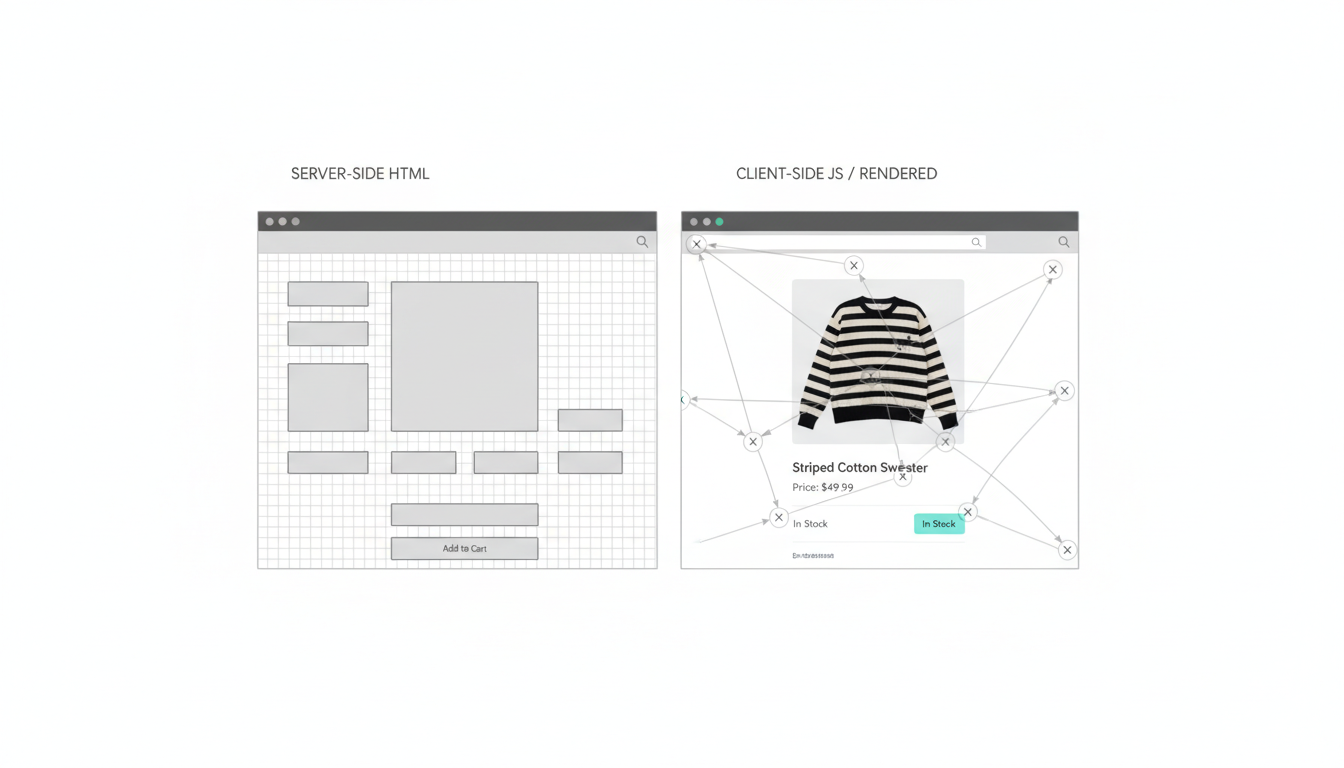
- Rendering validation – compares server-side HTML to rendered DOM for JavaScript issues
- Segmentation – analyzes crawl patterns by page type, template, or custom taxonomy
- API access – programmatic data extraction for automated reporting
Best for: enterprise sites with crawl budget concerns, JavaScript rendering issues, or complex information architecture requiring segmented analysis. The platform requires significant setup time and carries enterprise-tier pricing.
Lumar (formerly Deepcrawl) – Automated Site Monitoring
Lumar focuses on continuous monitoring rather than one-time audits. The platform crawls your site on a schedule you define, alerting your team when new issues appear or existing problems worsen. This approach catches regressions immediately after deployments instead of discovering them weeks later through ranking drops.
The site audit software for enterprises includes change detection that highlights exactly what shifted between crawls. You can track schema markup validator results over time, monitor redirect mapping accuracy, and verify XML sitemap validator compliance across every deployment.
- Scheduled crawls – automatic audits run daily, weekly, or after each deployment
- Change detection – diff reports show exactly what changed between crawl runs
- Team collaboration – assign issues to developers with context and specifications
- Historical trending – track issue counts and severity over months or years
- Custom alerts – notifications trigger when specific thresholds breach
Best for: organizations that need continuous monitoring and want to catch issues before they impact rankings. The subscription model and seat-based pricing can become expensive for larger teams.
Sitebulb – Visual Audit Reports
Sitebulb excels at translating technical findings into visual reports that stakeholders actually understand. The desktop application crawls sites with JavaScript rendering, then generates interactive reports with hints, warnings, and insights organized by priority and impact.
The index coverage diagnostics include clear explanations of why pages fail to index, with specific remediation steps. Mobile-first indexing audit capabilities compare desktop and mobile versions to identify rendering discrepancies that affect rankings.
- Visual reporting – interactive dashboards make technical issues accessible to non-technical stakeholders
- Prioritization – automatic impact scoring helps teams tackle high-value fixes first
- JavaScript rendering – Chrome-based rendering catches client-side issues
- Accessibility checks – WCAG compliance validation alongside SEO diagnostics
- PDF exports – shareable reports for client presentations or executive reviews
Best for: agencies and consultants who need client-ready reports, or internal teams presenting findings to executives. The desktop-only deployment limits automation potential.
OnCrawl – Technical SEO Platform
OnCrawl combines crawling, log analysis, and Core Web Vitals testing in a unified platform. The tool processes server logs to understand actual bot behavior, then correlates that data with crawl findings to identify discrepancies between intended and actual site structure.
The Core Web Vitals testing integrates field data from Chrome User Experience Report with lab data from crawls. You can segment performance metrics by page template, device type, or geographic region to pinpoint where optimization efforts deliver maximum impact.
- Unified platform – combines crawling, logs, and performance in one interface
- Data correlation – links crawl findings to log behavior and ranking data
- Segmentation – analyzes issues by template, category, or custom dimensions
- API access – programmatic data extraction for custom dashboards
- Performance tracking – monitors Core Web Vitals trends over time
Best for: technical teams comfortable with data analysis who want to correlate multiple data sources. The learning curve can be steep for teams without analytics background.
Google Search Console – Foundational Index Coverage
Search Console remains essential despite not being a traditional audit tool. The index coverage diagnostics show exactly which pages Google successfully indexed, which failed, and why. The Core Web Vitals report identifies URLs failing performance thresholds at scale.
The mobile-first indexing audit capabilities reveal rendering differences between desktop and mobile versions. You can submit XML sitemap validator requests, monitor manual actions, and track ranking changes for specific queries.
- Index coverage – definitive source for what Google actually indexed
- Performance data – query-level impressions, clicks, and position tracking
- Core Web Vitals – field data showing real user performance experiences
- Manual actions – notifications of penalties or indexing issues
- URL inspection – real-time rendering and indexing status for specific pages
Best for: every site, regardless of size or complexity. Search Console data should anchor every technical audit to ensure you’re fixing issues that actually affect Google’s indexing.
Building Your 2025 Enterprise Audit Stack
The right combination of tools depends on your specific technical challenges and organizational constraints. A JavaScript-heavy SPA requires different capabilities than a traditional CMS with internationalization complexity.
Stack Composition by Use Case
Map your primary technical challenges to the tools that address them most effectively. Sites facing traffic declines need log analysis to understand crawl budget allocation. Migration projects require redirect mapping and comprehensive crawl comparison.
- JavaScript rendering issues – Screaming Frog or Sitebulb for DOM comparison, plus Search Console for indexing validation
- Crawl budget optimization – Botify or OnCrawl for log analysis, correlated with Search Console coverage data
- Core Web Vitals problems – PageSpeed Insights API, Search Console field data, and WebPageTest for detailed diagnostics
- International site complexity – Screaming Frog for hreflang validation, plus manual spot-checks of rendered content
- Migration planning – Screaming Frog for comprehensive crawl comparison, with redirect mapping validation
- Continuous monitoring – Lumar or OnCrawl for scheduled audits, with alerting integrated into team communication tools
Configuration for Enterprise Scale
Tools require careful configuration to handle large sites without overwhelming servers or hitting rate limits. You’ll balance crawl speed against server capacity, especially for sites with dynamic content generation.
Set crawl concurrency based on your server capacity and hosting setup. A site on shared hosting might support 2-3 concurrent threads, while a dedicated infrastructure can handle 10-15 threads without performance degradation. Monitor server response times during initial crawls and adjust accordingly.
- Rate limiting – configure requests per second to avoid overwhelming origin servers
- JavaScript rendering – enable for SPAs but disable for static sites to save resources
- Crawl scope – exclude admin sections, search results, and infinite pagination
- Data retention – define how long to store historical crawl data for trending
- Export formats – standardize outputs for consistent ticket creation
Ticket Template for Implementation Velocity
The specification quality determines whether developers can fix issues this sprint or need three rounds of clarification. Your ticket template should include exact reproduction steps, expected behavior, acceptance criteria, and priority based on business impact.
A redirect chain ticket needs source URL, intermediate URLs, final destination, current status codes, and the correct target URL. Include the business context – this category page ranks for a high-value keyword and the redirect chain wastes link equity.
- Issue description – what’s broken and why it matters to rankings or user experience
- Reproduction steps – exact URLs and conditions that trigger the issue
- Expected behavior – what should happen instead, with technical specifications
- Acceptance criteria – how developers verify the fix works correctly
- Priority justification – business impact tied to traffic, rankings, or conversion
- Examples – 3-5 affected URLs showing the pattern, not just one edge case
Our engineering-led audit approach produces specifications that development teams can implement without multiple clarification rounds.
Measuring Audit Success Through Implementation Metrics
Tool selection means nothing without measuring whether audits actually drive fixes. Track time-to-ticket to understand how quickly findings translate into actionable specifications. Measure issue resolution rate to see what percentage of identified problems get fixed within two sprints.
Implementation Velocity Indicators
Time-to-ticket measures hours from finding identification to developer-ready specification. If your current process takes 40 hours to convert a crawl report into sprint-ready tickets, you’re bleeding implementation velocity. Target under 8 hours for critical issues.
Issue resolution rate within two sprints reveals whether your tickets contain sufficient detail. If developers close tickets as “needs more information” or “cannot reproduce,” your audit outputs lack implementation readiness. Target 80% resolution rate within two sprints for high-priority issues.
- Time-to-ticket – hours from finding to actionable specification (target: under 8 hours for critical issues)
- Resolution rate – percentage of tickets closed within 2 sprints (target: 80% for high-priority)
- Clarification requests – tickets requiring developer questions before work starts (target: under 10%)
- Regression rate – fixed issues that break again in subsequent deployments (target: under 5%)
- False positive rate – flagged issues that aren’t actually problems (target: under 15%)
Performance Outcome Tracking
Core Web Vitals improvements validate that your technical fixes deliver measurable gains. Track INP specifically – the metric replaced FID in March 2024 and carries significant ranking weight. Target 30-60 days for meaningful improvement after implementing fixes.
Index coverage error reduction shows whether your technical optimizations help search engines crawl and index your site more effectively. Monitor the Search Console coverage report weekly to catch new issues before they compound.
- INP improvement – interaction responsiveness gains after JavaScript optimization (target: 25-50% reduction within 60 days)
- LCP optimization – largest contentful paint improvements from image and resource optimization
- CLS stability – cumulative layout shift reduction through dimension specification
- Index coverage – reduction in coverage errors and increase in valid indexed pages
- Crawl efficiency – percentage of crawl budget spent on valuable pages versus waste
Migration-Specific Success Metrics
Site migrations require different success metrics focused on preserving existing rankings while improving technical foundation. Track redirect accuracy to ensure every old URL maps to the correct new destination. Monitor ranking volatility during the migration window to catch issues before traffic drops significantly.
Migration error rate measures what percentage of URLs fail to redirect correctly or return 404s. Target under 1% error rate for enterprise migrations, with zero errors on high-traffic pages. Use log analysis to identify which old URLs still receive search traffic months after migration.
- Redirect accuracy – percentage of old URLs mapping to correct new destinations (target: 99%+)
- 404 rate – new broken links introduced during migration (target: under 0.5%)
- Ranking preservation – keywords maintaining position within 3 spots (target: 90%+)
- Traffic recovery timeline – days to return to pre-migration traffic levels (target: under 30 days)
- Indexing speed – how quickly Google indexes new URL structure (target: 80% within 14 days)
For comprehensive guidance on migration planning and execution, see our complete technical SEO audit service guide.
Watch this video about best seo tools for technical seo audits usa 2025:
Operationalizing Your Technical Audit Process

Tools and metrics mean nothing without a repeatable process that converts findings into shipped fixes. Your audit workflow should integrate directly into existing development sprints, not operate as a parallel track that competes for attention.
Pre-Audit Objective Mapping
Define what you’re trying to fix before selecting tools or running crawls. Are you diagnosing a traffic decline? Planning a migration? Optimizing Core Web Vitals? Each objective requires different tool combinations and analysis approaches.
Traffic decline investigations need log analysis to understand crawl budget shifts, plus Search Console data to identify indexing changes. Migration planning requires comprehensive crawls of both old and new sites, with redirect mapping validation. Core Web Vitals optimization needs field data from real users, not just lab testing.
- Traffic decline diagnosis – log analysis + Search Console + historical crawl comparison
- Migration planning – dual-site crawl + redirect mapping + content parity validation
- Core Web Vitals optimization – field data + lab testing + resource waterfall analysis
- International expansion – hreflang validation + geo-targeting verification + content localization audit
- JavaScript rendering issues – DOM comparison + Search Console indexing + mobile rendering validation
Crawl Configuration and Execution
Configure crawlers based on your site architecture and hosting capacity. A site with aggressive caching can handle higher concurrency than one that generates pages dynamically. Monitor server response times during the first 10,000 URLs and adjust thread count if you see degradation.
Enable JavaScript rendering only when necessary – it consumes significantly more resources and time than HTML-only crawls. Static sites built with traditional CMSs rarely need rendering, while SPAs and JavaScript-heavy frameworks require it to catch indexing issues.
- Scope definition – identify which sections to crawl and which to exclude (admin, search, filters)
- Thread configuration – set concurrent requests based on server capacity testing
- Rendering toggle – enable JavaScript rendering for SPAs, disable for static sites
- Custom extraction – define regex patterns for site-specific data points
- API connections – link to Analytics, Search Console, and performance tools
Log Analysis Setup
Log file analysis for SEO requires consistent log collection and processing. Configure your web server to capture bot user agents, response codes, and response times. Export logs daily and ingest them into your analysis platform to maintain continuous visibility.
The log ingestion process should filter out non-bot traffic to focus analysis on search engine behavior. Segment by bot type (Googlebot, Bingbot, etc.) to understand how different engines crawl your site. Track crawl frequency by section to identify areas receiving too much or too little attention.
- Log collection – configure web server to capture bot user agents and timing data
- Daily export – automated log extraction and upload to analysis platform
- Bot filtering – isolate search engine traffic from general visitors
- Segmentation – analyze crawl patterns by section, template, and page type
- Baseline establishment – track normal crawl patterns to identify anomalies
Finding Prioritization and Ticket Creation
Audit outputs typically contain thousands of issues. Prioritize based on business impact, not just technical severity. A duplicate title tag on a page that receives zero traffic matters less than a slow INP score on your highest-converting product page.
Create tickets with complete specifications that developers can implement without clarification rounds. Include the issue description, affected URLs, expected behavior, acceptance criteria, and business justification. Attach screenshots or screen recordings for visual issues.
- Impact scoring – rank issues by traffic, rankings, and conversion potential
- Effort estimation – assess development complexity for each fix
- Quick wins identification – find high-impact, low-effort fixes for immediate gains
- Ticket creation – write specifications with reproduction steps and acceptance criteria
- Sprint allocation – distribute fixes across sprints based on capacity and dependencies
Post-Fix Validation and Monitoring
Verify that fixes work correctly in production and don’t introduce new issues. Recrawl affected sections after deployment to confirm resolution. Monitor Core Web Vitals daily for the first week after performance optimizations to catch regressions early.
Set up automated monitoring to alert your team when issues reappear. A redirect that works today might break in the next deployment if not properly documented. Continuous validation catches regressions before they compound into ranking drops.
- Post-deployment crawl – verify fixes in production environment, not just staging
- Performance monitoring – track Core Web Vitals daily for first week after optimization
- Regression alerts – automated notifications when fixed issues reappear
- Documentation – record fix details for future reference and team knowledge
- Impact measurement – track ranking and traffic changes attributable to specific fixes
Explore how a coordinated audit-to-implementation model works for enterprise teams – see our latest technical SEO research on implementation velocity.
Real-World Implementation: JavaScript Rendering Case
An ecommerce site with 200,000 products built on a React SPA experienced a 35% traffic decline over three months. Search Console showed decreasing index coverage, but the site appeared functional in browsers. The gap between rendered and server-side HTML created partial indexing.
We combined Screaming Frog’s JavaScript rendering with log analysis to identify the problem. The SPA hydrated product details client-side, but Googlebot saw only skeleton HTML. Critical product information – pricing, availability, descriptions – never reached the index.
Diagnostic Approach
The audit stack included Screaming Frog for DOM comparison, Botify for log analysis, and Search Console for indexing validation. We crawled the site with and without JavaScript rendering to quantify the content gap. Log analysis revealed Googlebot spent 60% of crawl budget on pagination URLs that generated no unique content.
- DOM comparison – identified 85% content difference between server HTML and rendered output
- Log analysis – revealed wasted crawl budget on infinite pagination and filter combinations
- Index coverage – confirmed Google indexed only 40% of product pages despite crawling the site
- Performance testing – showed INP scores above 500ms due to heavy JavaScript execution
Implementation Specifications
The ticket-ready specifications included exact HTML structure requirements, server-side rendering implementation approach, and acceptance criteria. Developers needed to render critical product data server-side while maintaining the interactive features that drove conversion.
We specified which elements required server-side rendering (product name, price, description, availability, images) versus which could remain client-side (reviews, recommendations, size charts). The implementation plan included staged rollout to monitor for performance regressions.
- Server-side rendering – implement SSR for product name, price, description, availability, and primary image
- Pagination cleanup – add robots.txt rules to block infinite filter combinations
- JavaScript optimization – defer non-critical scripts to improve INP scores
- Crawl budget allocation – redirect bot traffic away from low-value pagination
- Monitoring setup – daily checks on index coverage and Core Web Vitals
Results and Timeline
The development team implemented fixes across three sprints. Index coverage improved from 40% to 92% within 30 days. INP scores dropped from 520ms to 280ms after JavaScript optimization. Traffic recovered to previous levels within 60 days, then exceeded baseline by 18% as newly indexed products ranked.
- Index coverage – increased from 40% to 92% of product pages
- INP improvement – reduced from 520ms to 280ms (46% faster interaction response)
- Traffic recovery – returned to baseline in 60 days, exceeded by 18% at 90 days
- Implementation time – three sprints from specification to production deployment
This case demonstrates how the right tool combination produces specifications that developers can implement without extensive clarification. The audit-to-implementation velocity determined success more than the sophistication of any single tool.
Security and Compliance for Enterprise Audits

Enterprise organizations face data governance requirements that affect tool selection. Your audit platform needs proper access controls, data residency options, and compliance certifications. A tool that exposes sensitive URL patterns or customer data to third parties creates unacceptable risk.
Access Control and Authentication
Tools should integrate with your existing SSO infrastructure rather than requiring separate credential management. Role-based access controls let you restrict sensitive data to authorized team members. Audit logs track who accessed what data and when for compliance reporting.
- SSO integration – SAML or OAuth support for centralized authentication
- Role-based access – granular permissions by team, project, or data sensitivity
- Audit logging – complete record of data access for compliance verification
- Session management – automatic timeout and re-authentication requirements
- API key security – encrypted storage and rotation policies for programmatic access
Data Residency and Privacy
Some industries require that audit data remain within specific geographic regions. Verify where your audit platform stores crawl data, log files, and exported reports. European organizations may need GDPR-compliant data handling, while healthcare sites require HIPAA considerations.
Log file analysis presents particular privacy concerns since logs contain IP addresses and user agent strings. Ensure your analysis platform anonymizes or purges personally identifiable information according to your data retention policies.
- Data location – verify storage regions for crawl data and logs
- PII handling – automatic anonymization of IP addresses and user identifiers
- Retention policies – configurable data purging aligned with compliance requirements
- Export security – encrypted file transfers and secure sharing mechanisms
- Third-party access – clear policies on vendor data access and usage
Frequently Asked Questions
Which tool is best for technical audits?
No single tool covers all enterprise needs. Screaming Frog excels at comprehensive crawls with custom extraction. Botify leads in log analysis and crawl budget optimization. Lumar provides continuous monitoring with change detection. Build a stack based on your specific technical challenges rather than relying on one platform.
How much should I budget for audit tools?
Enterprise audit stacks typically cost $500-$3,000 monthly depending on site size and feature requirements. Screaming Frog costs $259/year for unlimited crawls. Botify and Lumar run $500-$2,000 monthly based on page count and features. OnCrawl pricing scales with crawl volume. Factor in training time and integration costs beyond licensing fees.
Can free tools handle enterprise audits?
Free tools work for initial diagnostics but lack the scale and automation enterprises require. Google Search Console provides essential indexing data at no cost. Screaming Frog’s free version crawls 500 URLs. These tools help identify issues, but comprehensive audits of 100,000+ page sites need commercial platforms with log analysis and continuous monitoring.
How often should we run technical audits?
Audit frequency depends on deployment velocity and site complexity. Sites with weekly deployments need continuous monitoring to catch regressions immediately. Quarterly comprehensive audits work for stable sites with infrequent changes. Run focused audits before major changes like migrations, redesigns, or platform updates. Monitor Core Web Vitals and index coverage weekly regardless of audit schedule.
What makes an audit finding actionable?
Actionable findings include exact reproduction steps, expected behavior, acceptance criteria, and business justification. A ticket stating “fix duplicate content” lacks implementation detail. Specify which URLs contain duplicates, what content should appear where, how to verify the fix works, and why it matters to rankings or traffic. Include 3-5 example URLs showing the pattern.
How do we prioritize thousands of audit findings?
Prioritize by business impact rather than technical severity. Score issues based on affected traffic, ranking potential, and conversion value. A critical technical error on a zero-traffic page matters less than a minor issue on your highest-converting page. Identify quick wins – high-impact fixes requiring minimal development effort. Create a prioritization matrix plotting impact against implementation complexity.
Choosing Tools That Accelerate Implementation
The best technical SEO audit tools for 2025 produce specifications that developers can implement this sprint, not documentation that sits in backlogs for months. Evaluate tools by implementation velocity – how quickly findings translate into shipped fixes – rather than feature lists.
Your audit stack should combine crawling capabilities with log analysis, Core Web Vitals testing, and workflow integration. No single tool covers enterprise needs. Build a stack that addresses your specific technical challenges while producing ticket-ready outputs.
- Prioritize JavaScript rendering validation and log analysis for modern web architectures
- Configure tools for scale with proper rate limiting and crawl scope definition
- Create ticket templates with complete specifications and acceptance criteria
- Measure success through implementation velocity and performance outcomes, not finding counts
- Monitor continuously to catch regressions before they compound into ranking drops
With the right stack and process, technical audits translate into shipped fixes and measurable performance gains. The gap between detection and deployment determines whether audits drive results or generate unused reports.
See how an engineering-led audit accelerates fixes and reduces implementation risk. Request a technical SEO audit or contact our team to get sprint-ready specifications and direct coordination with your development team.